Wednesday, 24 August 2016

What Is A Computer Network ( Computer Networking Basics)

Computer Network Basics


A Computer network is a collection of various smart devices such as computer, server, router, switch, printer, smartphone  and other network devices which are connected to share the data between them. As like in the human world, people talk or make friends with each other and then communicate, in similar way the computer network works so as to send/receive files commands or any other information from small to large area. The biggest example of a network is Internet.

Parts of a Computer Network (Computer Networking Basics)  

For creating a network among humans, there must be some minimum requirements. 
  • We must be a Human (ha ha).
  • We must have an understanding of Language.
  • And Finally, we must be able to hear and speak.
So these were the some few requirements for creating a network among humans. Similarly to create a computer network you first have a Computer or other smart device which have the capability of send and receive files or information to other devices following some predefined rules (protocols). 

Now there are various network devices which are used in computer network.

Computer 
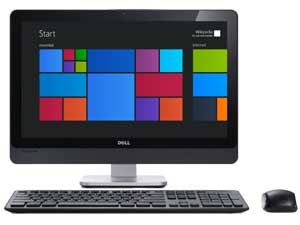
Computer Used in Computer Network  A computer is a smart device which is able to process different kind of data to  make a meaningful information. It is able to store a large amount of files, and other cluster which can then later used. It uses a NIC(Network Interface Controller) for communication in a network. 

So you have seen computers ? It's 2016 Dude ! What are you talking about !

And these computers have different form. It depends on the work. There are servers which does a dedicated work. Have you ever heard of File Server or Mail Server. In Simple Words a File server is dedicated for sharing files to other computers. 

In similar ways there are other big boys which are holding big networks such as super computers, workstations, mainframes and various small laptops, hybrid computers and finally computers.

Hub/Switch
Switch / HUB a Network Device A hub/switch is a networking device which is used to connect various devices in a local network. However, hubs are not used more as they were old and used to flood the network by broadcasting all the data to every port. But switches are smart devices which only send the data to a particular computer to which the data is to be meant. Learn more about Hub and Switches on computerhope.

Router
Router a network device
A router is a device which is used to route data packets i.e. to the right destination through various networks. A router is connected between two different networks and perform data transfer between those two or more different network using some kind of routing table so as to send that packet to it's destination. You have seen a router at your home or school. And now the router is full packed with a switch, a firewall and router itself. It has a variety of other functions like mac filtering, it can use to create bridges and a lot of other functionality.           

Other Network Devices 
There are variety of other network devices which had been built all around. Devices like wireless printer/scanner, smartphone, smartwatch, even smart shirt is there in the market. Now in today's life everything is going to connect.

Types Of Computer Networks

Computer Networks are classified on various types such as size, speed, and distance and their purpose. Some general purpose networks which are generally used to daily purposes like surfing internet, playing games, sending files among devices, printing are
  • LAN   (Local Area Network)
  • MAN (Metropolitan Area Network)
  • WAN (Wide Area Network)

LAN (Local Area Network)

Local Area Network  i.e. LAN; as it's name suggest LAN is used when computers and devices are connected within a limited area such as Room, School or an Office Building. In Such network, speed varies from 10 MB/s to 1 GB/s depending upon the cable and medium used for transmission.  In a LAN user count can be varied from 2 to 1000's. 

WLAN stands for wireless local area network and when local devices or computers are connected using wireless technology or without the use of any cable then it is known as WLAN.  And right now you probably on a wlan either your smartphone or laptop connected using wifi device. Even you can play games using wlan.

TAN stands for tiny area network and it's a small lan with users  limited up to 2 or 3. 


MAN (Metropolitan Area Network)

Metropolitan Area Networks connects two or more Local area networks between two or more big cities. This type of network is generally owned by a particular organisation/company or a person. A MAN is connected using switches or routers and for high-speed fibre optics are also used. Various community colleges are connected using MAN or a big university which have several campus across 12 to 15 kilometre can be connected using MAN. Another example of MAN was cable TV which was used till 2015

CAN stands for Campus Area Network and it is a form of MAN which is used in University or other large institutions which are spread across dozens of Kilometres.


WAN (Wide Area Network)

When computers and other smart devices are connected worldwide then this type of network is known as Wide area network. This network consists of various other small lan or other networks which are then connected the other networks over the world. And in this network, the distance covered is World-wide. And 'Internet' is the best known Wide Area Network present.  

Some Other Networks Based on Use    


  • SAN (Storage Area Network) 
  • EPN (Enterprise Private Network) 
  • VPN (Virtual Private Network)

SAN
refers to storage area network and these networks are very high speed and are used to access huge storage. Huge Disk arrays are connected to servers using storage area networks and appear locally connected. SAN is not accessible by LAN's as it has it's own storage network.  SAN is used where high data updates are required such as in an e-commerce website, or some data centre. 


EPN stands for enterprise private network and is created by companies or an enterprise to connect it's various branches to it's own single network to share computer resources in a secure way.

VPN  stands for virtual private network and it is the most secure network which is used now a days. This network use tunneling process in which a virtual tunnel is created to connect computers and each time if someone tries to hack this tunnel it changes it's path and re-connect again through another tunnel. In vpn you need to install a client to connect using a username and password to the network. It is used when a person wants to connect to his/her organization's network while on an open wifi connection. 


Network Topologies 

After learning about the types of networks, there are various ways in which computers are connected to a network. So the method or formation in which the computers are connected in a network is know as network topologies. There are various network topologies and topologies that are mainly used are Bus Topology, Star Topology, Ring Topology, Tree Topology, Mesh and Hybrid Topology. Internet is mainly connected using Star topology. We'll learn more about network topologies in future article.

Conclusion on Computer Network

A computer network had made our life easier, without a network we can't imagine a day in 2016. And the more we are being developed, the more and more computer networks are rolling in from our offices to our homes and have been an essential part of our life. Now even more advanced devices are rolling in the network but the network roots are the same and we are growing all on. So what are your views on Computer Networks and what do you think about them, Tell us in Comments.

Sunday, 21 August 2016

Still Downloading From Torrents ? Prepared for Jail Now

Surfing Blocked torrents or website will lead you to jail and fine of rupee 3 lakhIn this era of Digital India things are getting serious about torrent and other blocked websites. If you are still visiting blocked torrent websites by using some other alternate methods then be prepared for rupee 3 Lakh Fine and 3 Year Jail ! As of now, there are a lot of websites that are banned after The Court order and are not accessible normally. But if you access these websites by some other alternative methods then you are inviting a fine of Rupee 3 Lakh and jail for 3 Years.

Still Viewing Blocked Torrents Websites 

So what comes under this criminal category? 


  • Viewing Blocked Website in India
  • Surfing or Downloading Torrent File from Such Website
  • Watching an image on host like Imagebam
So now on keep in mind if ever surfing some xxx or other content and you land to webpage stating  "This URL has been blocked under the instructions of the Competent Government Authority or in compliance with the orders of a Court of competent jurisdiction. Viewing, downloading, exhibiting or duplicating an illicit copy of the contents under this URL is punishable as an offence under the laws of India, including but not limited to under Sections 63, 63-A, 65 and 65-A of the Copyright Act, 1957 which prescribe imprisonment for 3 years and also fine of upto Rs. 3,00,000/-. Any person aggrieved by any such blocking of this URL may contact at urlblock@tatacommunications.com who will, within 48 hours, provide you the details of relevant proceedings under which you can approach the relevant High Court or Authority for redressal of your grievance."

So if you tried to open such website or torrent either by proxies or by some other alternate ways then Indian police gonna hook you up.  Till now Indian government block such websites using DNS filtering, that means The Government will provide a list to ISP's and they just put these website to their DNS server's black list. So whenever a user tried to visit that website, the page or message was displayed about the block. 

So people started to use other ways to visit such websites; either by using google dns or some third party network. Now there is some more advance method of blocking websites through internet gateways. Now if gateway term is new to you then just assume that it's like a gate and before reaching to such website they will push back.

But it is still not clear that will government monitor each and every network. 

HEY NEXT SNOWDEN IS FROM INDIA


Final Words on Visiting Torrents

So now you have known that Indian government had now serious and guys just don't risk your life for a movie or a game, just go and buy because it will be cheaper than Rupee 3 lakh and also enjoying your game or movie at your house is much better than living in Jail with criminals who even don't know what torrent is and for what crime you are in ? Ha ha It won't happen guys ! Just quit all bad browsing habits and enjoy the life without some free torrents.

So If you have Enjoyed this article and have any suggestions or questions then mention them in comments and aware your friends more and more by sharing this article on Social media. 

Friday, 19 August 2016

How To Bypass Annoying Surveys Online 2016 for FREE

Latest and Best Survey Remover tools of 2016 for Free. 
How To Bypass surveys online 2016
How many times you had found your best download , and then a screen pops up ' Please Fill In This Survey To Continue To Downloads' and at that moment it feels like just break the computer and shouting loud.  And then we start searching for how to bypass those surveys, as we just want that info or data. And you will be amazed that there are some Free Online tools that will bypass those online surveys for you in 2016.

Do you Know Why These Surveys Occurs ? 

These surveys pops out because the website owners as like me wanted Money. Who doesn't love money ! Don't You ? Even they are earning a lot from traffic but still a little more will be good. So the best and easy way to earn money on your website is displaying those surveys and the website owners are paid for each completed surveys. 

Sometime you get lucky and have an option to get rid of that survey but for most of the time that little saviour option is not there so it becomes very very important to bypass surveys online in 2016.

What's your Browsing Experience When These Surveys Comes In ?

Uhhh! I become angry when these surveys waste my time. These surveys not only waste your time, but they are so annoying and always asks to fill a form, or to buy a product which have no scope and some of the people do believe on those offers like ' iPhone for Rupee 500' and pays them thus by making their loss. 

So here are some methods which can bypass those annoying surveys online in 2016 and you can try them for Free.

Best Free Online Survey Bypass Tool

Survey Bypass

Survey Bypass is the best  free tool of 2016. It is very easy to use, first you just need to give the url or website link to survey bypass and it will scan the website and it gives a lot of options of encrypting pages, encrypting url, allowing cookies and also it removes scripts and objects so as to unlock the downloads. Also with survey bypass you can report those websites which consists of these surveys and then they will find a way to break those surveys and that's why this website is the best survey bypass tool of 2016.
   

Survey Smasher 

Survey Smasher is another website to bypass online surveys in 2016. It have a very friendly user interface and that's why it is easy to use survey smasher. This website convert all links to one link without any registration.  And you can upload files to mediafire and enjoy unlimited downloads without any registration.


Survey Remover

Survey Remover is another tool to bypass online surveys and the speciality of this software is that you can download locked files and then can get access to your required files easily.


Software to Bypass Surveys 

Sharecash Survey Killer 

This is the best survey killing software of 2016 which are organised by sharecash. Now to bypass surveys just follow these steps.

  1. Download ShareCash first.  
  2. Now after that install Survey Cash
  3. Now Run the App Survey Cash
  4. Enter the File Location , that you want to download.
  5. Click on Download.
  6. And then Save it.
In this way you can easily bypass the survey. 

Survey Remover Tool 

This is the survey remover tool of 2016 which completes the task by blocking the websites that contains surveys thus by saving your time on those annoying forms. This tool is absolutely free and you can download it from  Survey Remover Tool's website.


Bypass Surveys With Browser Extensions

So why the hassle of visiting websites for removing surveys if your browser can do it for your itself. It will just block all those bad websites which have those survey traps for you. The extensions will detect those scripts and will block them.

XJZ Survey Bypasser  For Google Chrome  

This extension detects and block all those websites which contains survey. You can download this extension on your google chrome browser by the chrome web store

Redirect Bypasser Add-on for Mozilla Firefox

As like in google chrome's xjz survey bypasser, here in Mozilla Firefox redirect bypasser exists. It's an extension which also detects and block the websites containing surveys. So if you are a Mozilla Firefox user then you can download it from Mozilla Addon Store.

Are These Online Surveys Bypassing Techniques Works in 2016 ?

This is very interesting Question.  Sometimes yes and sometime no. As these online survey removal tool also needs input and they receive it when people reports about the websites containing surveys. 

The developers do their research and then we are told about that. And most of the tricks on how to bypass surveys does work in 2016 and these all tools are free to use and will sure prevent your time and money from wasting. 

So if you like this article on how to bypass surveys online 2016, then you can share it with your friends on Facebook, Twitter and other social websites. Also you can share your experience with us.   

Wednesday, 17 August 2016

Smartphone that will fit Inside budget of 15,000 Rupee August 2016

Smartphones under 15,000 in August 2016If you are planning to buy a cellphone nearly in August 2016 and you are stick to your budget of Rupee 15,000 then here are some selected android smartphone that will fit inside 15,000 INR. Here we will pick those smartphones which have a price tag around 12 thousand to 15 thousand max and had recently rolled in people's pocket. 

Smartphones under the budget of 15,000 in August 2016

Asus Zenphone 2 ( Price Rupee 14,999) 

Asus-Zenphone-2 under 15,000 Rupee in August 2016Asus Zenphone 2 is the best smartphone in the range of 15k, and it consists of good features under this price range. Zenphone 2 is packed with quad-core 1.8 Ghz on Intel Atom Z3580 chip-set backing with 4 GB RAM and PowerVR G6430 GPU. It have a Full HD screen of 5.5 Inch and 13 MP back camera and 5 MP front shooter and is future proof with LTE technology. This smartphone comes with a 3000 mAH and with android 5.0 Lollipop. This smartphone also have a 2 GB RAM Zenphone 2 under  13 thousand rupee with FHD display but it's 14,000 variant is packed with good display, so I recommend you to go for it. Asus Zenphone is priced for Rupee 14,999 only at Amazon.


Xiaomi Redmi NOTE3 ( Price Rupee 11,999)
Xiaomi Redmi note 3 Cellphone Under 15,000 August 2016Smartphone under budget of 15,000 Rupee - Xiaomi Redmi Note3 is another smartphone under 15 thousand rupee which you must check this August. As Xiaomi had already ruled the Indian market with it's awesome and cheap devices. And Redmi Note3 is another soldier making Indians life easier. It is packed with  Qualcom Snapdragon 650 which is clocked at 1.8 Ghz with Adrino 510 GPU along 2 GB RAM, full HD 5.5 inch display, dual sim 4G support, finger  print scanner, 4050 mAH battery, android lollipop 5.1, 13 MP rear shooter and 32 GB internal storage which cannot be expanded. And with a beautiful metallic body it attracts people toward it. For buying this device, you need to register on amazon.


Lenovo Zuk Z1 (Rupee 13,499)


Lenovo Zuk Z1 Smartphone of August  2016 Another popular cellphone in August 2016 is Lenovo Zuk Z1. This cellphone is lashed with Snapdragon 801 with Quad-core 2.5 Ghz Krait 400 with Adrino 330 as GPU. It have internal storage of 64 GB and is accompanied by 3 GB RAM. For shooting it have a 13 MP Sony sensor with image stabilisation dual led Flash and 8 MP front MP camera. This smartphone comes with full HD screen of 5.5 inch and is a dual sim standby with 4G technology.  On the sensor side it have Finger Print sensor, Accelerometer, gyro, proximity and compass. It have battery of 4100 mAH and it comes with usb type c connector and is run by Android 5.1.1 OS by  Zuk z1 was previously sold in flash sale on amazon but later on it available without registration. Lenovo Zuk Z1 is available for 13,499 on Amazon.


Moto G Plus, 4th Gen (Rupee 14,999)
Moto G plus 4th Gen  budget cellphone under 15,000
Smartphone under the budget of 15,000 rupee august 2016:  Moto G plus 4th gen is the another cellphone under 15,000 rupee in August 2016. It have Snapdragon octa-core processor with clock of 550Mhz, Adrino 405 Gpu, 3 GB RAM, 32 GB internal memory expandible up to 128 GB. This cellphone comes with latest Android OS 6.1 Marshmallow. For shooting images this smartphone have 16 MP rear camera and 5 MP wide angle front camera. It have a fingerprint scanner to lock and unlock cellphone. It supports dual sim with 3G and 4G ready. Moto G Plus is priced at rupee 14,999 at Amazon.  


These were the some of the best phone under 15,000 rupee in August 2016 which you must check before buying a cellphone in this month. If you have any queries and suggestion related to these cellphones then do mention them in comments. 


Tuesday, 16 August 2016

How to pay BSNL wimax Bill Online ( Pay Landline /GSM /CDMA bsnl bill online)

how to pay bsnl wimax bill online
How to pay BSNL wimax Bill Online ( Pay Landline /GSM /CDMA bsnl bill online)If you are a BSNL wimax user and making BSNL bill payment online for the first time then here is how you can pay BSNL wimax bill online and not only wimax, you can pay landline, gsm, cdma bill online through bsnl portal easily.

How to pay BSNL wimax Bill Online

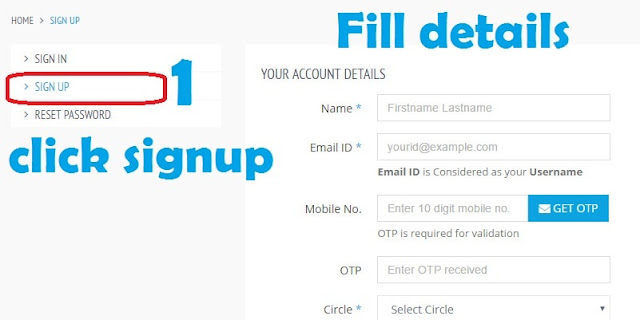
Now to pay wimax online bill you first need to signup to bsnl portal and create an account for bill payment. For signup you need an email account, a working phone number ( BSNL number will be best) for verification and notifications of bsnl bill online payment. And you also need to fill your BSNL Circle(mostly your State name). And after that just create a password. 
Signup On Bsnl Portal For Bill payment online
Now After signup and verification of your phone number, you can now login to your bsnl portal to add services. 

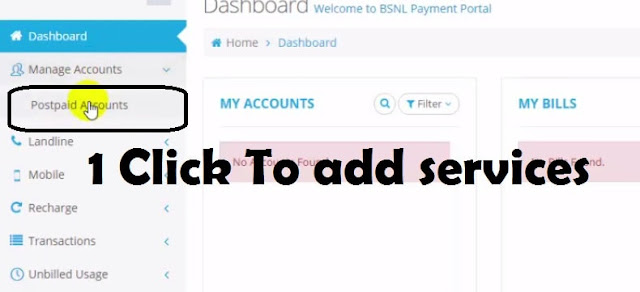
Now after logging in you will see two columns named as 'My accounts' 'My Bills'  stating no bills found. Now you need to add account for that first on the left side under Manage Accounts, click on 'Postpaid Accounts' . From here you can add Wimax , gsm , cdma and other services which you are using and wanted to pay bill.
Click to Add wimax Service for online bill payment


Select bsnl Wimax for wimax bill online payNow Manage Account page will open and then click on 'services' tab and there a Drop down menu will open. From that menu you need to select Wimax or you other service for which you want to make a bill payment online.  


Wimax online bill Now after that you will see 'Wimax-ID' , 'Account number', 'Nick name'. You will get these all information from your e-bill or your paper bill. Wimax-ID refers to user name which is like 'UB10xxxxxx@bsnl.in' but just copy only first 10 digits of username and leave @bsnl.in part and put it on Wimax-ID portion and 'account number' will be there in your bill. And after that put a nick name where it is asked and click on submit. 
Pay now option for making bsnl bill online payment
Now click on 'Dashboard' and you will see there your linked wimax account. Under 'My Bills' section you will see your wimax id and as soon as you will click on that, a pay now slider will originate and after clicking on it you will be redirected to online payment page.


Making Payment For BSNL wimax Bill online

Now you are redirected for making payment. Now there are a lot of options for making payment such as netbanking, credit card, debit cards and other payment method. If you have online banking activated then you can use net-banking and you will be asked to select your bank. But as every one doesn't have net banking enabled so Debit card is more easy option for paying. So select 'debit card' and then you need to check the brand of Debit card which will be written on bottom of card. Debit card Brands ( How to pay bsnl wimax bill online)


After selecting appropriate brand of your card, you will asked to select payment gateway. You can select any one of them. After selecting these, click on continue to payment and you will be redirected to page where your debit card details will be asked for bsnl bill online payment. 
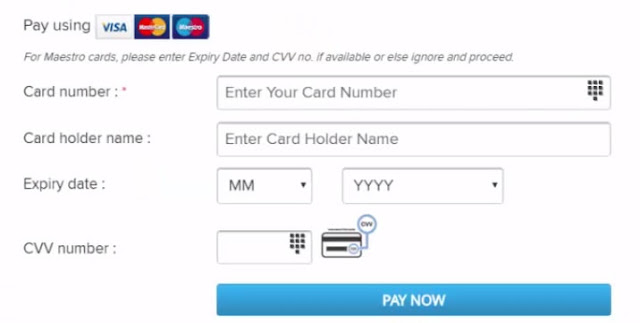
Card Details Required for paying bsnl bill online
Debit Card details Required For bill payment


Now fill all these details like card number is of 14 - 20 digits so put it there on 'card number', on card holder name put your name or the bank account holder name after that check for the expiry date on card. You will find card expiry date in front ( 2/24) and for cvv number you need to look on the back of your card. It is just a three digit number. 


After that you when you will click pay now, you will be redirected to another page where OTP will be asked, or if you are using your Card for the first time, then it will ask for atm pin. And after that a password will be sent to your cellphone number which is registered with bank. And as soon as you punch that code the payment for BSNL wimax bill online will be made. And you will be redirected with a bill receipt. You can save it or you can check your email for bill receipt. 

To understand more you can check out vido on How to Pay BSNL Wimax Bill Online


In this way it is very easy to pay all bills online and now you can easily pay bsnl wimax bill online and respective services. So if you find this article helpful, then give your feedback in comments and if you have any suggestions or problems, you can mention in comments and share  this article with your friends as knowledge increases by sharing.   

Sunday, 14 August 2016

How to download YouTube videos without Software Installation

A lot of time while surfing YouTube you want a video offline download, to your computer or mobile device without a software, so here is how you can download YouTube videos without software installation just by using a YouTube downloader url. A lot of site to download YouTube videos, not just only provide your favourite video offline but they also have options for the conversion of your favourite video. 

Sites to download YouTube videos without any software Installation

How to Download YouTube Videos without Software Installation

As in this YouTube world the term 'YouTube offline download'  does exists so to make this happen there are a lot of sites to download your videos. So here are some of few websites you may consider for taking your favourite videos offline.

KeepVid  

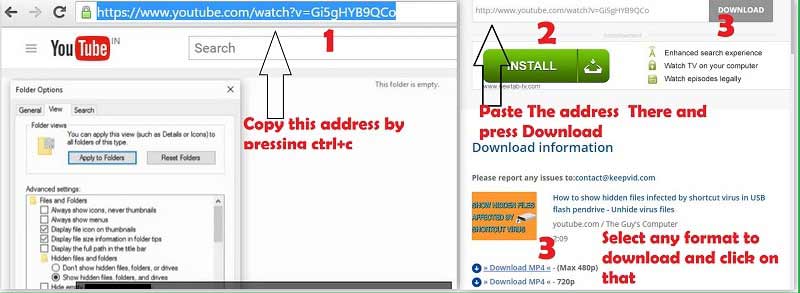
KeepVid is the best and popular website among the people to download their favourite video for offline purpose. Even KeepVid just not only can be used to download from the second largest search engine, but you can get videos offline from Facebook, Twitch, Dailymotion and many more. For downloading a video first you need to copy video URL from youtube and then paste it on KeepVid where it is asked and after that press 'Download'. You will get some resolution options like 480p or 720p. Just click on any of them and your video for offline download will start. You can visit KeepVid from donwloading YouTube video.

Download Youtube Videos from KeepVid (youtube offline download)
Download Youtube Videos from KeepVid
  
Clipconverter

Clipconverter is another online youtube downloader(site to download youtube videos) which also give you more control over the downloaded video by converting them online to various formats like 3GP, Mp4, AVI, MOV. Also if you just want a song not the video then here you will get an option to download in mp3, aac audio format. To download any video or audio from a video just copy the url of the video as done earlier, and paste in clipconverter box and then after that select the format which you want and then hit download. And you can upload any video from your computer to get a mp3 version of the song in the video. You can download youtube videos without a software by visiting clipconverter.
Clip converter Site To download YouTube Video without software installation


Video DownloadHelper 

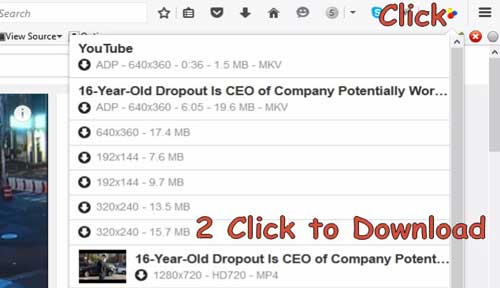
This video downloaderhelper is for the people who love to use Mozilla Firefox. It is an extension which you can easily add to your Mozilla and when you will visit YouTube next time just a look at the top right of your browser, you will see three circled (red, blue,yellow) icon, just click on that and it will show a list of options in various video format and resolution along with it you will be provided by the downloading details of that video.
Video Downloader Helper for Mozilla Firefox
Video Download Helper For MozillaFirefox

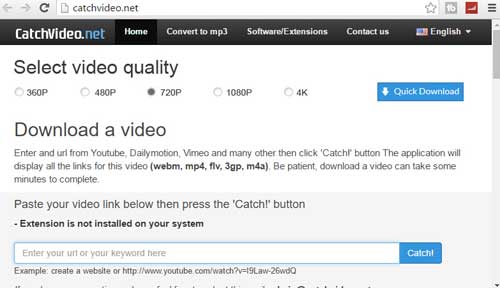
The other site to download youtube video is CatchVideo. It is a java based video downloader and you must have latest java with java enabled in your browser. This is very fast video downloader and also you willl get options to download in different format. Just put the url of the video which you want to enjoy offline and select video quality and hit Catch! and that's all. Your offline download will start. Visit CatchVideo to download video from youtube without any software installation
How to Download YouTube videos without any software using CatchVideo
CatchVideo to Download YouTube video without Software Installation


SaveFrom

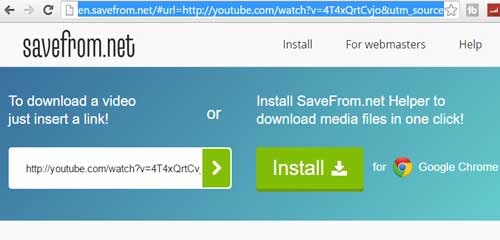
SaveFrom is a smart website to download youtube videos which just make your work all next to nothing. When you want to remove all hassle of copy and paste then this website is for you. To download video just put ss before youtube like as done in this url
"https://www.youtube.com/watch?v=4T4xQrtCvjo" "https://www.ssyoutube.com/watch?v=4T4xQrtCvjo"
Savefrom site to download youtube videos without any software download
SaveFrom site to download youtube videos
So these were the very few sites to download YouTube videos without any software installation. Now you can easily watch your favourite shows offline and  take it with you. Also if you are song lover then you can also convert your youtube video to audio using the website clipconverter

If you find this article on 'how to download youtube videos without software' useful then do not forget to give feedback in comments and do share it with your friends too. And Happy Learning. 


Saturday, 13 August 2016

How To Build a Gaming Desktop Computer Under 40,000 Indian Rupee

Build a desktop computer under Rupee 40,000
Are you thinking about assembling a new desktop computer and wish for a gaming Desktop Computer under tight budget of Indian Rupee 40,000 there here are some of the chosen components which can give you a rich gaming experience with the resolution of 1920*1080(30-60 Fps) in your tight budget.


Hardware Package For your Gaming Desktop Computer

Performance Gaming PC in Budget of 40,000 Rupee
Build a Gaming Desktop in 40,000 Budget

A gaming computer is defined by it's top end performing hardware that is capable to play all the games in top end settings but here as with the tight budget we gonna build something cool that will give you enjoyment and thrill of most of the new games in the market. So here are the components which will be the part of your gaming package.

Processor  
Intel Core i3 6th Gen

Intel Core i3-6100 6th Gen
Clocked at 3.7 Ghz 
Cache 3MB
2 Cores 4 Threads
Power Usage 51 Watts

Price May Rise Soon 

 Buy Now

Processor is the most important part of a gaming PC. As it is the brain of the computer so to process your hard core gaming we have chosen Intel Core i3-6100 6th Gen which is based on Skylake Architecture (Launched in 2015) which reduces power consumption and adds up greater cpu and gpu performance.It has 2 Cores/4 threads and operates on the frequency of 3.7Ghz and power consumption is only 51 Watts and this boy have it's cache memory of 3MB and it is ready for gaming. And priced at Rupee 9,150 at amazon only


Motherboard
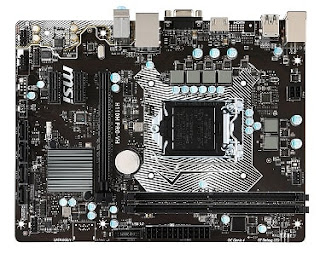
MSI H110M PRO 6th Generation DDR 4 Mother Board for gaming pc
MSI H110M PRO 6th Generation DDR 4 Mother Board
Supports 6th Gen Intel Processors
2 DDR4 Memory Slots supports upto 32 GB
1 HDMITM Port supports 4096*2160 @ 24Hz
2560*1600@ 60HZ
Intel H1160 Chipset with 4 SATA PORTS which support transfers upto 6GB/sec 
Buy It now


As you know motherboard is known as the Backbone of the Computer, so here for a high performance Gaming pc we have chosen MSI H110M PRO 6th Generation DDR 4 Mother BoardIt Have 2 DDR4(2133 MHz) memory Slots which can support memory upgrade up to 32GB. It have 4 SATA ports which supports transfer up to 6GB/sec. It have 1 HDMITM port which supports maximum resolution of  4096*2160@24Hz and 2560*1600@ 60Hz . It have total 5 USB ports and our Skylake boy is going to fit in it. MSI H110M PRO 6th Gen is priced at Rupee 5169 only at Amazon.in


Random Access Memory

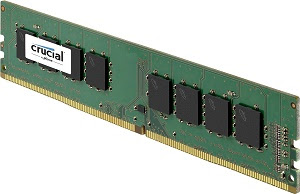
Crucial 8GB DDR4 Gaming RAM  Crucial 8GB DDR 4
 Clock 2133 Mhz
 Voltage 1.2 Volt
 Un buffered 

Buy Now

RAM is the crucial element for a gaming PC.A memory with good clock speed can change your gaming experience. So here we have picked up Crucial 8GB DDR4 RAM for your rig. It have a clock speed of 2133 Mhz and it is unbuffered RAM that means the data will directly sent to the CPU without any middle storage. It is power efficient RAM and you can get this gaming RAM for Rupee 2592 Only at Amazon.in 


Storage

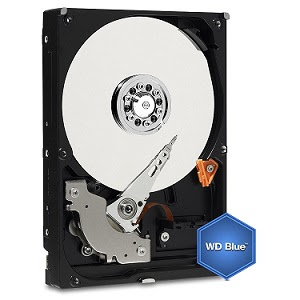
WD 1TB  Desktop Internal Hard DriveWD 1TB  Desktop Internal Hard Drive

Runs at 7200 rpm
1TB Capacity
64 MB Buffer Size
2 Year Warranty 

Buy Now


As you are thinking about building a Gaming PC, then an enough storage is required as in 21st century Games have massive sizes and you don't ever wanted to run out of space for your new game. With storage speeds does matter a lot. With 7200 rpm WD 1TB Desktop internal hard drive is a value for money with greater speed. You can get WD 1TB for Rupee 3,724 Only at Amazon.

Graphic Card 

Asus Strix GeForce GTX-960

2 GB GDDR5
1291 Mhz factory Overclocked
1371 Mhz GPU bosst (OC Mode)


So the most Crucial part without which you can't imagine a Gaming computer is here. Asus Strix GeForce Gtx-960 rules the heart of gamers all over the world and it had ranked second on Stream Hardware and Software Survey of 2016 and is preferred by world class gamers. This graphic card remains almost silent while playing light games and at hardcore gaming it remains 30% cooler with 3X quieter performance. It's GPU tweaks allows you to modify clock speed, voltage fan performance and more. And the more important thing is about it's fame is that it's price and performance ratio. It had got a lot of high rating by the buyers. You can get this Nvidia GPU worth Rupee 18,700 at amazon. This device had varied it's price a lot so it's better to make a decision fast.


Power Supply


Corsair VS Series VS550 - 550 Watt SMPSCrossair VS Series VS 550
A dedicated +12V rail offers maximum compatibility with latest components.
AC input from  200~240V
Over Voltage, Under voltage, Over current and short circuit Protection
Buy Now


So with these above high performance devices we require a decent power supply which can be able to complete these beasts needs. So we will go with Crossair VS Series VS 550. It is a 550 Watt power supply which will easily complete the power needs of your hardware. You can get this power supply for Rupee 3550 and is available in Amazon. 


Cabinet  

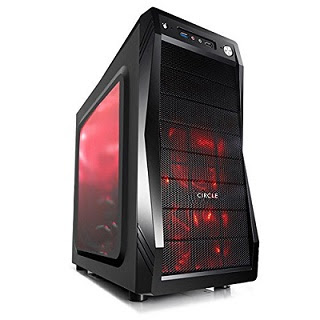
Circle Gaming Cabinet CC 821 without SMPSCircle Gaming Cabinet CC 821
Steel Black Body
Compatible with
ATX/Micro ATX/ Mini ITX
3 LED Cooling Fans

Buy Now


This cabinet cc 821 is a top notch gaming cabinet which will add some sick looks to your gaming rig. This cabinet have 7 Expansion slots, external 3.5 Drive bays, external 5.25 inch Drive Bays, 3 SSD slots,  2 HD front audio port,  A front usb 2.0 and 3.0 port. And this stylo is priced at Rupee 3650 on Amazon.in 


Final Verdict about This Budget Gaming PC

So here is your full fledged Gaming computer ready on your hands. And the hardware packed is top notch in and is ready to fit in your budgets. This  Core intel i3-6100 have on board graphics Intel HD 530 which you will found with i5 and i7.  About graphic card we already had discussed that it's the second most popular Nvidia video adapter among gamers in the World. And if you just want a powerful hardware to edit videos then it can also do it for you. So overall we had stick to the budget and in case the prices goes up and down, the total cost may rise upto 42 to 44 thousand rupee. But this gaming pc is all value for money. 

So if you enjoyed 'how to build  a gaming desktop'  and have any questions regarding this topic you can mention them in comments and do not forget to share this article with your friends.

Friday, 12 August 2016

How to show hidden files affected by Shortcut Virus

show hidden files affected by shortcut virus
Are you files hidden from your usb drive and you are unable to find your hidden files even after changing folder options , then sure your usb drive is a victim of a  usb shortcut virus which have hidden all your files. So here is how you can show hidden files affected by shortcut virus.

Show Hidden Files Affected By Shortcut Virus

how to show hidden files affected by shortcut virus
How To show Hidden Files Affected By Shortcut Virus 
To show files affected by virus here are few steps you need to follow. 

First go to 'Control Panel' and at the search bar type 'File Explorer Options'
File Explorer Options to show hidden files
File Explorer Options


Now click on 'File Explorer Options' click on 'View' tab. And now check 'Show hidden files, folders and Drives' 
Show hidden files and folders affected by shortcut virus
Show Hidden files, folders, and drives


Now after that scroll down on the same 'File explorer Options' and look for 'Hide Protected Operating System Files(Recommended)' and un-check it or remove check mark(tick mark) and there will be a warning message, just click on 'Yes' and then 'Apply'. 
Show protected Operating system files show hidden files
Show Protected Operating System Files


Now in This way your infected hidden files will be recovered and now you can watch them.


Removing Shortcut Virus Effect Using Command Prompt

If you already have a lot of hidden files which are now hidden forever and you always needed to change the 'File explorer Options' each time you want to access them, then here is a trick to show up those hidden files back.

First Open command prompt. In windows 10 right click on windows icon and then click on 'Command Prompt (Admin)'. Or you can simple search 'cmd' and and highlight the result and press 'Ctrl + Shift + Enter' Command prompt will open in admin mode.
Open Command Prompt As admin
Open Command Prompt As Admin


Now enter the letter of your infected USB drive like 'G:'  followed by colon and press enter. Now type these command 'attrib -a -s -h /s /d' and hit enter.
Commands to show hidden files affected by shortcut virus
Commands To show Filess  Affected By shortcut Virus

Now what these commands mean which are used to show hidden files 

-a    This command prepare your files for archiving.

-s  This command will change the selected files by assigning 'System' Attribute

-h  This command will assign the hidden attribute to folders selected.

/s     Stands for search for entire folder as well as sub folders.

/d    Stands for including the process folder.

 So now we have understood how we can unhide the folders affected by shortcut virus on pendrive.


Also You can Check Video on ' How to show hidden files infected by Shortcut Virus'


Prevention And other Tricks to Safeguard your Data from Shortcut Virus 

If you need to use your flash drive infected with a shortcut virus, then these are the steps you can follow to preserve your data from being infected or getting hidden.

First create a new folder in that pen drive and while transferring data from the infected computer always use copy and paste method and paste the data inside that newly created folder. In this way your data will not hide. 

Another and easy way is to install Quick Heal Antivirus as this antivirus automatically recovers those files which had been hidden due to a shortcut virus . Also don't forget to update your antivirus software. The best free antivirus software that you can try is Avast 

So now you can easily show and recover hidden files affected by a shortcut virus. If you find this article useful then share it with your friends too. 


Hey, we've just launched a new account on Twitter You'll like to connect - https://twitter.com/theguyscomputer
Join Our Newsletter